Thursday, 14 October 2010

Few gästar zedonk!


Few gästar lunds studentradio, Radio AF, och programmet zedonk måndagen den 25e oktober! Lyssna på 99,1 eller via http://radioaf.se mellan kl.16 och 17. Fews nya singel "Mentally Alive" kommer att spelas!

Monday, 24 May 2010

Change bookmark-icon on the N900


To change the icon/thumbnail of a bookmark on the n900; edit the "~/.bookmarks/MyBookmarks.xml". Along with every entry there is line pointing to a thumbnail-image in the "~/.bookmarks/thumbnails/" directory, create your own icon and point at it from the xml-file.

Monday, 5 April 2010

Pacsoft med Firefox

För att installera unifaun webprint pluginen i firefox:
Flytta filen "NPMagLbl.dll" till Firefox pluginsfoldern.
C'est Tout!

Saturday, 22 August 2009

Metacity allows alt-right-click resize!

I
don't know when this happened but it [finally] did! After years of pain... After hours of searching the web for a fix... After eons of inconvenience... They finally let users decide for themselves; how they wish to resize their windows in a stock gnome environment!

Every software update was an adventure


Naturally it is possible to use other window-managers than metacity, but anyone who has ever tried to use non standard software in mainstream distributions know that it can be a bit tricky. Small interoperability problems start to rear their ugly heads and every software update becomes an adventure.

The problem has been solved by the editing of a simple gconf key;

/apps/metacity/general/resize_with_right_button.
Now you too can have Metacity window operations that work the way they were supposed to.

Wednesday, 27 August 2008

How linux kernel boots

T
his is an absolutely beautiful presentation detailing how your computer boots, in this case using Linux.

This is a screencast of a talk given by Bart Trojanowski before the OCLUG (Ottawa Canada Linux User Group).

The slides were created using the open source MagicPoint, an X11 - though text-based presentation program. In other words; use your favorite text-editor to create your slides.

Barts presentation describes the boot-up process using very innovative and illuminating slides. Well worth the trouble of taking a look :^)

Tuesday, 26 August 2008

Rss/website discrepancy


I
t seems as if Metro might be useing ready-made boiler-text for its articles. Two ready made articles that go either way and then they just print the one that turns out to be correct...

Warning: Swedish language skills necessary.

Translation (loose):
  • top image="German woman released"
  • bottom image = "Court found her guilty!"

Sunday, 3 August 2008

Shopping spree madness!

H
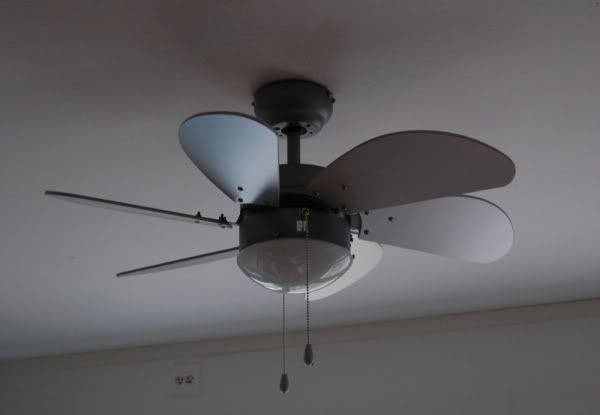
ome improvement mania! This is our new fan... bought at jula at a fairly reduced price. A good thing is that it will keep you cool in the summer and warm in the winter time. I was initially very disappointed by the grayish color, it seemed much lighter on the website. False marketing!


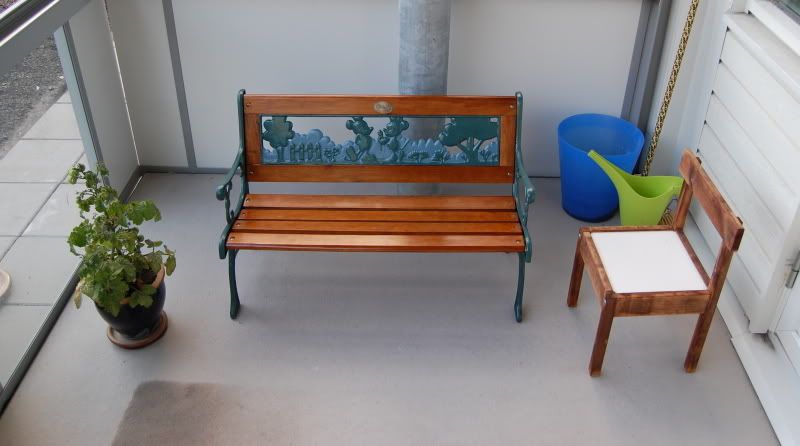
Small park-bench for the girls... bought at Bauhaus. We got this bench to match it to the big one. It gets oohs and aaahs from people.

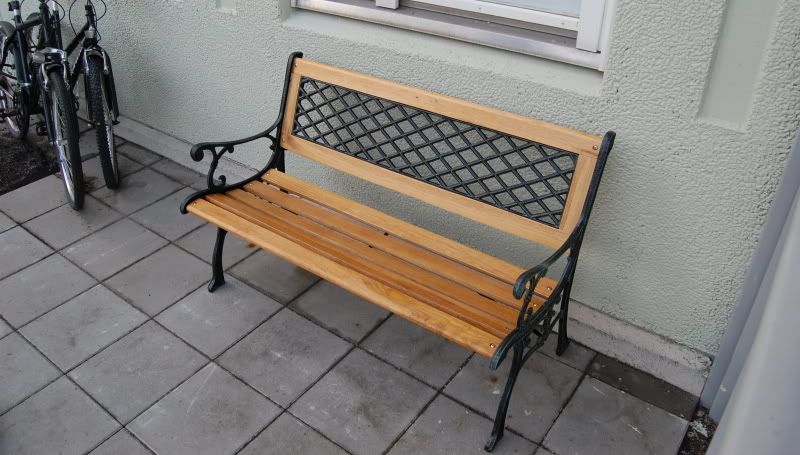
Park-bench for the big people... Between this and the colour of the building we are well on our way to creating our own little theme-park.


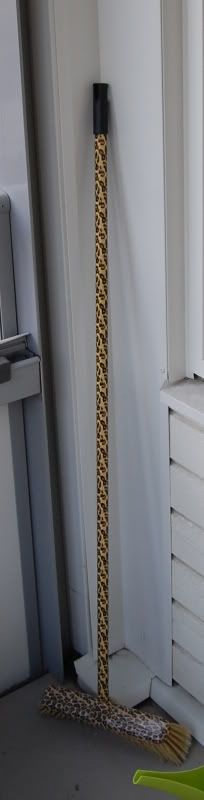
And of course a mambo-broom to take care of business... from Rusta. We spent a lot of money on this stuff. If you think that the broom is a bit conspicuous you're right. But it is nothing compared to the zebra patterned one with the red brush.

The right kind of broom is pivotal in keeping the balcony clean. And having it look this good is just an added boon ;^)

Friday, 1 August 2008

T
wo excellent themes combined. The windowdecorations are silmathorons Aluminium 1.1+2.0 (Emerald Beryl theme). An Emerald theme created to match the Aluminium theme for gtk2.

The Gtk2-theme used here is a combination of the standard Clearlooks-theme and the Aluminium-theme. I call it dclear.

The background btw is one of the staple wallpapers for ubuntu-studio.

Thursday, 10 July 2008

Compiz to the rescue... Again!

G
rowing resentment over Metacitys inability to let me choose which mouse-button to use for resizing windows has led me into the loving arms of Compiz, once again.

I thought that I could learn to live with the GNOME Desktop hegemony but I was wrong. After a long and hard search of the internet I have yet to find an elegant solution to my problem; remapping "-Mouse2" to "-Mouse3". I even went so far as to consider KDE4. Since KDE4 doesn't seem to be ready to emancipate me just yet I had to find someting else to get the job done.

Compiz does it again. I found that I would rather have a slightly heavier desktop than live with using the middle mouse-button to resize my windows. After tweaking the Compiz settings a bit it proves quite fast and I do like that windows fade to gray instead of displaying an hourglass/wristwatch at the cursor. Windows going down in a blaze of fire is also good fun.

Thursday, 3 July 2008

Absurdly kitchy computer case!

A
bout two months ago we decided to purchase a new computer desk. A computer desk that would fit better into our new home.

I had installed most of the components of our small computer system into the new desk when disaster struck! The most important component of all - the actual computer didn't fit! The computer compartment was too small to house the bloated (Fujitsu-Siemens Scaleo T) computer case!

Yes I know... I'm an idiot for not taking the measurements of the case before leaving for IKEA. But in every failure there's an opportunity - sometimes for more mistakes.

Before calling me an idiot. Bare in mind that I have already gotten what I deserve in my new computer case.

We decided to get a new case... (this was not the mistake).We decided to get a white computer case... (we're getting close). The actual mistake emerged as a slight oversight. I had tried very hard to make the computer desk and computer components look unified, in doing this I had forgotten a small detail - the color of the old case's front-components.

Believe it or not but I did not notice this obvious aesthetic issue before migrating the contents of the old computer case to the new one. However after slamming the front cover shut, it slowly dawned on me... I had made a slight color matching error.

As if that wasn't bad enough, the case wasn't the same shade of white as the desk and the silver linings made the case look like a gaudy old ivory makeup case. In the combination with the off black components the case has reached a new height of originality and lack of style.

Sunday, 30 March 2008

Back to the original

A
few years back when I was first introduced to the graphical world of Linux - there were two graphical interfaces to choose from; KDE and GNOME. The K Desktop Environment (KDE) looked more like a newer implementation of the windows gui while the Gnu Network Object Model Environment, while resembling the mac interface, just seemed more outlandish and original.

A lot of the percieved originality was probably due to the default window-manager in GNOME; Sawfish.

Unlike Metacity (the current window-manager in GNOME) Sawfish allows for the Meta+Mouse3 (Alt+right mouse button) window resizing that I previously wanted in an earlier post.

While using the old window-manager did work it also created a lot of compability issues. These issues clouded the consistency of the Ubuntu desktop i bit. For example the sawfish workspace switcher proved impossible to turn off! Themes obviously don't work as they used etc etc. All of this made me give up my quest for Alt+Mouse3 clicking. I now use the standard desktop as provided.

In the earilier post I sought to solve the issue by using compiz, the composite 3d-"windowmanager". That solution was a horrible kludge though, due to the fact that I didn't really want all those bells and whistles. all I wanted was the Meta+Mouse3 window-resizing!

Besides the new version of Ubuntu, Hardy Heron 8.04, doesn't let you change the keymapping for window-resizing at all!

To The Rescue – KDE!

After seeing oxygen and Plasma, two of my biggest gripes with KDE seem to be gone. The interface is overhauled and some of the pro's of GNOME has been injected into KDE. A simple, easily overviewed and non-confusing interface was basically all that was missing from KDE. Now the most competent Desktop for GNU/Linux systems has a nice clean interface. When the usable version of KDE4 (4.1) is shipped with ubuntu – I'll probably make the switch. From my old love; GNOME - to a new one; KDE.

Silver shoes

F
elicias new shoes! She is seriously proud of them and they were a part of a three for one (at skopunkten) offer costing totally less than 500 swedish crowns!

Saturday, 29 March 2008

46 395:- phone bill

H
ave you ever had one of those days?.. That just seem surreal. A couple of days ago I recieved this slightly upsetting electronic invoice from my GSM-provider.

I have an unlimited data-plan called "fri surf" (free surf ed. trans) and apparently some software on my providers side have failed to put two and two together.

I'm waiting for an sms-reply as to what actually went wrong but the support staff solved the problem on the spot. So it's only a hypothetical problem now :^)

If you ever wondered how expensive it would be to use a cellular phone as your primary internet device at the standard rate of 15 SEK/MB... well now you know! Quite a contrast from the 100 SEK fee for "fri surf"!

Yeah!

Keep on rockin' in the big shoes

Friday, 15 February 2008

Nokia E51 - No BS

T
hose two little words basically sum this phone up. I might be wrong, of course, but barring the absence of a small camera in the front for video-calls - it lacks nothing. Basically this is a smart-phone that mimics an ordinary phone. The slight wedge-shape of the bottom-part of the phone makes it perfect for snug pockets. The Nokia e51 is a good basic phone.

The keypad is small but distinct, the buttons feel nice with a slight laptop-feel to them. The only negative thing about the keys is the soft-button's size and placement. The angle and size of the left/right soft-button that could easily lead to erroneous key presses if one is not careful. The “OK”-button and navigational-ring will probably live forever – they're excellent.

The screen is crystal clear. A 2" display is probably as big as it gets on a phone of this size. In combination width the excellent color depth, youtube works OK.

I use my E51 as a (detachable) wireless broadband modem via the tele2 mobile network. My girlfriends SE w910 is actually better at this than my Nokia E51 since it supports usb networks. In practice this means that all you have to do is plug the phone in and surf away! After issuing the mandatory “ifconfig usb0 up” , I don't even consider this a step a step. The Nokia requires a serial approach, by using /dev/ttyACM0 as modem one simply dials (I use wvdial). This is my configuration (right):

Bluetooth configuration has yet to work for me - I could make it work with the trusted old Nokia 5500 sport by substituting “/dev/ttyACM0” with “/dev/rfcomm0” in the wvdial.conf-file but my current Nokia just won't have it... I haven't really tried the wifi but whenever I come across an open network it is as easy to surf the web off as the gprs is – no problem.

Using the E51 with Ubuntu 7.10 was no problem. Universal Mass Storage support for the NON-INCLUDED 2gb “hotpluggable” microsd-card that I ripped out of the 5500 sport and and pc-suite mode for data-transfer ie modem use. Unfortunately neither gammu nor gnokii supports it yet so no syncing! Not an enormous problem unless you want to back your calendar up... In which case it is.

Between the built in BrowserNG symbian browser and the java midp Opera browser virtually all web content is available. I don't know why but Nokia refuses to deliver this phone with stopwatch/timer applications but there is one available at mosh for free that seems to work well enough. I think that anyone who has come in contact with the standard calculator for S60v3 has learned to loathe it! There's a replacement called Calcium at mtvoid.com. The screenshot was taken using 'Screenshot for symbian s60'. The future of the PC is dead... and gone. It belongs to the mobile phone now! Everything in personal computing that I once needed a complete computer for can now be done with a tiny 100 gram mobile phone. I say the future because the day of mobile rule is not quite here yet. But the second they can figure out how to squeeze these things into the moblie - is the second I toss my desktop computer in the bin.

Full "big boy" operating system – access to applications.
qwerty-keyboard/voice recognition – fast text input
support for HD-video/TV-out

I soon learned that mailing using predictive/non-predictive text IS hell. qwerty desperately needed! 2” screen - it works - but built in projector or TV-out would be nice. Until then I'll have to make due with this extremely slick and capable phone.

Monday, 22 October 2007

Resolutions wallpaper

A
simple wallpaper that lets you check out what your site might look like at different screen-resolutions, without having to change your actual resolution.

resolutions.png

Just resize your browser window to fit in the applicable square and that's it. Not a perfect solution obviously but handy if all you want is to check what elements are visible at different screen-sizes.

Saturday, 1 September 2007

Phone for harsh environments

Nokia 5500 Sport

(It still seems to have everything though)

I
t was time, time for an update! My old lg kg320 had played out its part and it was now time to find a replacement. A replacement that could deliver the basic functionality now lacking in my old workhorse. If one may call it that when I almost never got to use it - not much of a social life you see. And since calls are so rare in my life I have come to value them immensely. Making the need for a new mobile phone immediate.

A small fact of life that has always annoyed me is the illogical way in which mobile phones are dispersed among the populous. The smallest phones tend to end up with the technology-savvy mobile enthusiast while the larger clunkier models find their way to the casual users. The casual user who may not use their mobile phone very often, but rather wants it for availability, should opt for the smaller phone since it would be less obtrusive. While the enthusiast should be the one who ends up with the larger phone. Larger meaning room for more features.

I, at any rate, ended up getting the "Nokia 5500 Sport". Admittedly it was not my first choice (the new Nokia e90 communicator looked pretty good to me) but as it turns out fancy, posh and perfect phones don't do well in grease-laden industrial environments, not at all unlike my own workplace. And so I felt the need to revise my plans slightly. A tougher more rugged phone seemed advisable...
In this new "gem" of mine, a couple of features stood out:

TTS - STT
Tapping

Text To Speech and Speech To Text. The ability to have a computer-generated voice read me my text-messages never ceases to make me happy. I take every chance I can get to fire up my own HAL 2000 and marvel at the current state of technology. And "yes" I am easily amused ;^)

The device automatically makes a voice-record of all of your contacts. Press down the right "soft-button" for a second and a half, say the name of the contact you wish to call and the phone will dial their default number. This feature also extends to a few of the applications, like the voice-recorder and bluetooth manager. One can also add other applications manually.

Tapping

Once set up one can easily play, pause, skip forwards and backwards by tapping the phone with your fingers. Two taps on the bottom of the phone pauses playing music or plays paused music, while tapping the right side of the phone skips to the next tune, tapping the left side skips back.

Tapping the phone within 30 seconds of receiving an SMS makes the TTS-system read the message for you. When in sports mode; tapping makes the TTS tell you what your current training statistics are.

3d-accelerometer

Through which a flurry of applications are derived. The 5500 Sport has the ability, by virtue of being angled at active people, of functioning as a workout tool. After entering your own personal data like height and weight etc. the built in pedometer will calculate how many calories you burn while "power walking" to work every day. A feature more likely to be used is the Groove game. The game consists of a maze through which the gamer would angle the phone to navigate a steel ball. I found the game seriously addictive and along with the new 3d rendition of the Snake game (Snakes) I have all I am going to need for a long time.

Operating System

The phone uses Symbian 60 3rd edition. I have already downloaded oggplay that enables me to play my ogg-files and a small horde of apps that might come in handy one day, including putty for ssh.

Gmail Works!

The phone supports SSL which makes it possible to check your gmail account. My old phone did have a mail-client but lacked TLS/SSL.

The Browser

is Nokias own xhtml-browser. And it is EXCELLENT! It is definitely better than ie6 at rendering web pages and it will do css. If the page is larger than the screen, as it always is, a thumbnail overlay will appear to show you where your at. click at the picture above for an example.

Python!!!

This really blew my mind. My phone had a python interpreter preloaded on the included microsd-card. This opens up an entire new world of opportunities.

Wrapping up

All things said I am very happy with my choice of mobile phone, except for these "few" points;

  • Connecting the phone to computer over USB
    My desktop computer summarily refused to mount the
    telephone as a usb mass storage device. I use Ubuntu 7.04
    (Feisty Fawn) as my desktop. The solution? format the card!
    After formatting the MicroSD-card in the phone it was found
    by the mounting software. Now it all works.

  • The awkward placement of the menu-button
    I'm constantly tricking myself into pushing the
    contacts soft button. Silly me! but everything else works so
    nicely I just had to say something about this.

  • Battery life
    If one uses all of the phones features; e-mail,
    mp3-player (or oggplayer - oggplay), play a few games and
    browse the web your battery won't last for more than a
    day! Summa sumarum it's all good and well having all this
    functionality - as long as you don't use them, the price to pay
    for the size of the phone I gather.)

  • The ad-45 hands-free adapter?
    The hands-free adapter that was included in my box, namely
    ad-45, is a bit short on perfection. The cable is so
    short; that I have to carry the phone in the belt-clip.

  • No software cd included!
    Normally this is not a problem for me. I generally
    never use the included cd but since all of the
    software is PREinstalled on the accompanying 64MB
    microsd-card (not nearly big enough) it would be nice
    to have access to the cd. Moving installed programs
    from the old card over to my new 2GB card could prove
    a bit tricky.

If all of the software-packs were available online then I would side with Nokia and consider the cd superflous but... They aren't!

Saturday, 11 August 2007

Phew! IE 6 Support...

F
inally! Now my little site "works" with the archaic headache-generating browser a.k.a Internet Explorer 6! It is not perfect but at least a basic level of functionality is has been reached.

Now the site works with every "big boy" browser out there.

I had to download Opera for linux to check out how this page would look like in that browser, and to my surprise it worked! They had packages for Ubuntu Efty/Fiesty but only for the i386 architecture though. This was easily circumvented by forcing it on to the system:

dpkg --force-architecture -i opera_9.22-20070716.6-shared-qt_en_i386.deb

As long as you have the apropriate 32bit-libraries - it should work.

Monday, 16 July 2007

My current Desktop

Screenshot

B
ecause the default window-manager in Gnome (Metacity) refuses to adhere to the contemporary X standards for window movement and resizinging, or even make it possible to, I decided to give the beryl 3D windowmanager a try.

These are the standard way of moving and resizing windows under X:

  • Alt+Mouse1="move window"
  • Alt+Mouse3="resize window"

Beryl is absolutely beautiful. And I think I'll actually stick with it for a while.

  • Gnome Theme = Gorilla
  • Beryl Emerald Theme = frame (by pomalin)

Slackware DVD-cover

Scalable Vector Graphics
I
created this normal-size DVD-coverimage using inkscape 0.45 on Ubuntu 7.04. Designing this cover was a great opportunity to learn a little more about SVG.

Link to a zip containing all images and inkscape-compatible svg-file.

A point not to be forgotten is that the penquin-graphics and the Slackware-button were not created by me. The Slackified Tux-image was taken from the Slackware propagande site: http://www.slackware.com/~msimons/slackware/grfx/ and the Slackware button was found somewhere on the internet.

Oh... lest I forget - the background tile was snatched in its entirety from the slackware website. It's all more of a composition really...